
Articles
How to Re-record BIOS Winbond W25Q128JV
Table of contents (Index)
How to Re-record BIOS Winbond W25Q128JV Step by step
1. Introduction
This technical manual aims to describe, in a standardized and... proprofessional, the proprocedures for re-recording and substituition of Chip BIOS Winbond W25Q128JV, applicable to plates that use chipwithout encapsulation SMD ou socket DIP/DIL.
The content aims to assist electronics and computer technicians in correctly understanding... processo, as demonstrated in the technical reference material.
The video only shows the exchange. SMDbecause the exchange of chip DIL/DIP It's very simple, just follow step 7 in this manual.
2. Application and Compatibility Models
O proThe described procedure is similar for various types of encapsulation. SMD, although there may be slight variations depending on the model of chip or the motherboard.
Common encapsulations SMD:
- SOIC8 150 thousand
- SOIC8 200 thousand
- SOIC16 300 thousand
- WSON8 8×6 mm
- Other encapsulations SMD equivalent
Common encapsulations DIL/DIP:
- DIL8 300 miles
- DIL16 300 miles
- Other encapsulations DIL ou DIP equivalent
3. File Naming Convention BIOS
The recording files of chip BIOS They can be found under different nomenclatures and generic names, such as:
- File .bin
- Firmware
- File EPROM
- File BIOS
- File for Flash Memory
- dump
Observation: Update files (.cap, .rom, .fd, among others) should not be used for direct re-recording of chipbecause they do not contain the complete firmware, which can cause errors and confusion in determining if the defect is in the firmware. BIOS It is indeed clear that this generates a great waste of time with unnecessary interventions.
4. File Manufacturers and Standards
This is a description for making the exchange. proprofessional of chip BIOS Winbond W25Q128JV. These are among the most well-known manufacturers worldwide and are widely used. proExamples of procedures include:
5. Technical Responsibility
This manual presents technical guidelinesAny necessary adaptation is up to you. sole responsibility of the executing technician.
The diagnosisstiCorrect identification of the fault and confirmation that the defect is related to the file. .bin BIOS Winbond W25Q128JV are essential for successful repairs.
6. ProWithdrawal and Re-engraving of Chip BIOS SMD
6.1° Disconnect all types of power supply (including battery/cells) BIOS).
6.2° Check if the model of the board to be substithe file was deleted .bin has a BIOS or more. It's quite common for current models to have more than one. chip BIOS, such as:
BIOS MAIN, BIOS EC or even 3 or 4 chips with different firmwares on the board. In cases where there are two or more BIOS to perform the re-recording of chip correct.
6.3. Before removing the chip to be re-recorded, note the position of Pin 1 of Chip and the Pin 1 position printed on your board at the location where it is soldered.
Take a picture to record all the details and micro capacitors and resistors positioned around the chip BIOS Winbond W25Q128JV.
6.4. Remove the Chip BIOS Winbond W25Q128JV, which is on the board, is being used with a rework station (hot air blower). The temperature depends on the station and the... prooccupational (exposure time) ranging from 360°C to 450°C.
6.5° Remove the old solder with a soldering iron mesh (to avoid damaging the board, use a Japanese or American brand).
6.6. Clean the terminals of chipto avoid residual solder and to allow placement in the recorder socket without damaging, warping, or causing poor contact in the recording terminals.
6.7th For the re-recording of chip BIOS Winbond W25Q128JV, use files from protransfer, such as those made available in our STORE Archives .bin.
It should not be used for re-recording Chips BIOS Winbond W25Q128JV, update files that are made available by manufacturers, which only contain part of all the firmware necessary for the chip BIOS to function correctly.
This is a crucial step for successful motherboard or electronic device repair. proThe recording process must be carried out by the responsible technician, who is qualified to perform the service.
6.8. After re-recording the chip BIOS Winbond W25Q128JV, reinstall it. chip in the position of pin 1 in the same direction as the pin 1 position printed on the board, (becoming identical to the photo taken before removal of the chip BIOS).
The side containing the chamfer or circle, counting from left to right in a U shape.
As shown in the figure below:

6.9. Solder the chip BIOS Winbond W25Q128JV soldering all terminals with a soldering station. The temperature depends on the station and the prooccupational (exposure time) ranging from 360°C to 420°C.
6.10° Use solder flux to shape the solder and avoid causing cold solder.
6.11 Clean the flux with a non-aggressive remover or isopropyl alcohol.proPliconic acid with a purity of at least 99%.
6.12° Use a compressor to dry the cleaning residue. (the compressor must have an air filter and not expel water).
6.13. Check for any short circuits or soldering errors (if connected with a short circuit, it will damage the...). chipCheck the image to see if any components have been removed from the board or if the pads and traces have been damaged. process.
6.14° Reconnect the power supply and test the board.
DIP/DIL
7. ProWithdrawal and Re-engraving of Chip BIOS on Socket on the Board (DIP/DIL)
7.1° Disconnect all types of power supply (including battery/cell). BIOS).
7.2° Check if the model of the board to be substituído has one or two BIOS, Cases are two BIOS to carry out the exchange of chip correct.
7.3. Before removing the chip to be to be substiNote the position of Pin 1 of the Chip and the position of Pin 1 of the Winbond W25Q128JV where it is soldered.
7.4. Remove the Chip which is written on the plate, using your hand, tweezers or a thin screwdriver... all very carefully.
7.5th For the re-recording of chip BIOS Winbond W25Q128JV, use files from protransfer, such as those made available in our STORE Archives .bin.
It should not be used for re-recording Chips BIOS Winbond W25Q128JV, update files that are made available by manufacturers, which only contain part of all the firmware necessary for the chip BIOS to function correctly.
This is a crucial step for successful motherboard or electronic device repair. proThe recording process must be carried out by the responsible technician, who is qualified to perform the service.
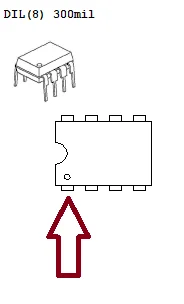
7.6. After re-recording the chip BIOS Winbond W25Q128JV, place the chip again at pin 1 position in the same direction as pin 1 position on the board, observe the chip to be submittedstituido and change respecting the position of pin 1 (becoming the same as chip understi(everything).
The side containing the chamfer or circle, counting from left to right in a U shape.
As shown in the figure below:
7.7° Check that none of the component terminals are bent.
7.8th Case proIf the process has not taken more than 5 minutes… please wait at least 5 minutes before reconnecting the battery. BIOS.
7.9° Reconnect the power supplies, including the Battery. BIOS and perform the test on the board.
8. Important Alerts
The evaluation, testing and the need or not to re-record the Recording File bin must be performed by a technician with technical skills and responsibility. It should not be performed by laypeople.
It is not possible to know only through symptoms whether the reported defect is actually in the Recording File BIOS Whether it's a Winbond W25Q128JV or another component, this can only be done by someone performing the tests on the board.
9. Final Considerations
For the board to function correctly again, the defect must be effectively related to... recording file BIOS Winbond W25Q128JV.
The success of proThe procedure depends on the diagnosis.sticorrectness depends on choosing the right file and precise technical execution.
Complete Guide to Chip BIOS Winbond W25Q128JV
1. Introduction
O chip Winbond W25Q128JV It's a high-performance flash memory. prodesigned to store data on diskpositivoelectronic systems, such as systems of BIOS on motherboards. It is widely used in systems that require fast and efficient data access. This guide provides a comprehensive overview of it. chip, including its specifications, characteristicssticas, design, proInstallation process, advanced settings and customization.
2. Detailed Manual
What is chip Winbond W25Q128JV?
The Winbond W25Q128JV is a chip flash memory SPI (Serial Peripheral Interface) with a capacity of 128Mb, prodesigned to store the code of BIOS on motherboards. It allows data storage in a non-volatile format, meaning the data remains intact even after the system is shut down.
3. Technical Specifications
- Type of memory: NAND flash
- Memory capacity: 128Mb (16MB)
- Interface: SPI (Serial Peripheral Interface)
- operating voltage: 2.7V to 3.6V
- Reading speed: up to 104MHz
- Recording speed: up to 40MHz
- Support for multi-block read commands
- Kind of packing: SOIC-8 (Small Outline Integrated Circuit)
- Operating Temperature: -40 ° C to 85 ° C
4. Main Characteristicssticase
- Capacity of 128Mb: O chip It offers excellent storage capacity for maintaining system settings and boot code.
- High speed: It supports high read and write speeds. proportioning one ofsempI'm quick with boot systems.
- SPI Interface: The Serial Peripheral Interface (SPI) allows for fast and efficient communication with the system.
- Reliability: It has characteristicsstiCASes that guarantee high resistance and durability, with support for extensive read and write cycles.
- Low energy consumption: Ideal for dispositivos that require low energy consumption.
5. Design and Construction
The design of the chip W25Q128JV It is optimized for applications in systems. compactsuch as motherboards, dispositivoIoT and embedded systems. It is packaged in a format SOIC-8allowing easy integration and monitoring.tagin small-sized printed circuit boards (PCBs).
The construction of the chip is made of robust materials, ensuring resistance to extreme temperatures and adverse conditions, such as shocks and vibrations, common in industrial and automotive environments.
6. Step-by-Step Installation
Step 1: Preparing the motherboard
Before installing the chip, make sure that the motherboard has a slotproprivate for the chip SPI Winbond W25Q128JVConsult the motherboard manual to verify the model of the chip Supported.
Step 2: Soldering the chip in PCB
- Positioning: Place the chip Place the pins in the correct slot on the PCB, aligning them with the corresponding holes.
- Welding: Use a soldering iron to solder the pins of chip On the board, ensure a good electrical and mechanical connection. Take care to avoid short circuits.
- Verification: After soldering, check the connections using a multimeter to ensure all pins are correctly connected.
Step 3: Connecting to the system
Connect the motherboard to the system and boot from the disk.positivo. O chip should be automatically recognized by BIOS from the motherboard, and the initial configuration will be loaded.
7. Setting up the BIOS
Once installed, it needs to be configured. chip Winbond W25Q128JV na BIOS from the motherboard:
- Access the Setup of BIOSDuring system startup, press the corresponding key (usually
DelouF2) to access the Setup of BIOS. - Detecting the chip SPI: A BIOS should automatically recognize the chip SPI. If it is not detected, check the SPI jumper setting on the motherboard.
- SPI configurationIn the configuration section of BIOS, activate SPI mode and adjust the read and write speeds to optimize the performance.sempI have.
- Saving and ExitingAfter configuring the options, save the settings and exit. BIOSThe system should restart automatically.
8. Advanced Features and Customization
O Winbond W25Q128JV It offers several customization options, depending on the system implementation:
- Multiple reading mode: The memory supports reading multiple blocks at once, which speeds up data loading and system initialization.
- Security standards: A BIOS It can be configured to enable memory security, preventing unauthorized recordings.
- Startup customization: A BIOS It can be customized to search for specific startup files. proproviding more precise control over the proboot process.
9. Conclusion
O chip Winbond W25Q128JV It is a robust and efficient solution for storage systems in BIOS, proProviding high speed and reliability, its configurability and customization capabilities make it ideal for embedded systems and industrial applications. Following the step-by-step installation and configuration instructions will ensure a successful outcome.sempoptimized design, allowing your dispositivo to function efficiently and reliably.

File .Bin all with Download now!
Since 2002 +100.000 Versions of BIOS
Buy anywhere of the 195 countries